

Contact-Level Intent helps you find the exact people who are actively researching topics related to your product or space. Monitor topic interest for individual contacts inside the ICPs and Personas you care about.
Why Contact-Level Intent
Most intent tools stop at the account level, showing only that a company may be researching a topic. UserGems goes deeper by surfacing who inside the company is showing intent, so your team can prioritize actual buyers instead of guessing which contacts to engage.
What you can do
- Track interest at the person level. Choose from a large catalog of B2B and B2C topics and see which people show recent interest.
- Filter by ICP and Personas. Edit both inline during setup.
- Estimate audience size. See a directional audience estimate as you configure.
- Combine with other signals. Layer intent with other signals in the UG Signals library to strengthen your outbound
How it works
We’ve partnered with several leading global providers of consensual marketing cookie data, which together cover more than 2.5B marketing cookies across millions of B2B websites globally. They analyze users’ browsing to determine only the most relevant intent indicators.
When people browse these sites, we analyze which topics are most relevant across their recent activity. From there, the system identifies individuals who match your ICPs and Personas and have shown interest in the topics you’ve chosen to monitor.
This way, we can cut through the noise of false intent and provide relevant and timely information. UserGems is further enriching this data to provide accurate contact-level data that are actionable in campaigns.
You decide which topics to track and can merge them into custom intent groups: for example, one for AI tools and another for CRM integrations. When contacts match your criteria, they appear automatically in UserGems so you can:
- Build new audiences
- Tailor your messaging
- Layer intentwith other signals
This gives you visibility into who is actively researching topics related to your solution, not just which companies might be.
All data is processed in the United States and handled in accordance with standard data privacy regulations.
Setup
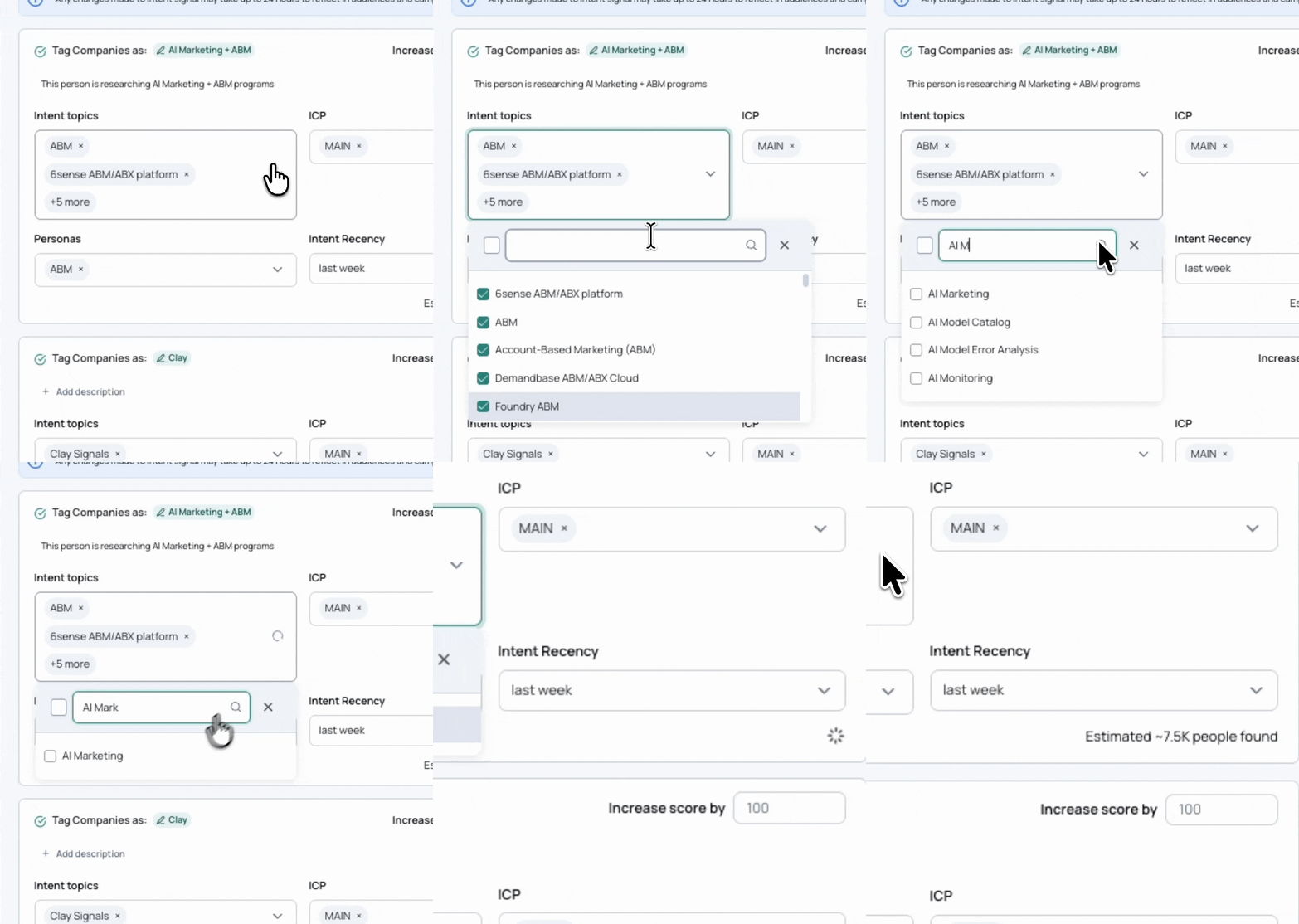
You can create a Contact-Level Intent signal directly from the Signals page in UserGems. The setup flow lets you define which topics, ICPs, and Personas to monitor (without leaving the builder)
- Go to Signals Library → choose Contact-Level Intent.
- Click on “+Create Intent Signal” and name your intent group.
- Select topics within your intent groups
Pick any number of topics from the catalog. Matching logic is “ANY of the selected topics.”You can group topics by theme (for example, “Marketing Tools,” “Sales AI,” or “CRM Platforms”) to create separate intent groups for different plays.
If you want to monitor separate groups of intent (for example, AI tools vs. Competitors), create multiple intent signal groups instead of one broad one. See this guide for suggestions on how to group your intent.
- ICP
Select one or more of your Ideal Customer Profiles.
Contacts at companies that match any of the selected ICPs will be included - Personas
Select one or more Personas.
Contacts who match any of the selected Personas will be included. - Tracking Window
Define how long a contact’s activity remains valid for the specific intent group (for example, 1 week or 30 days).
When you first create an intent group, UserGems automatically includes up to the last 14 days of recent activity so you start with a populated audience right away. After that, the window continues to roll forward in real time. (Note: exception is for custom topics) - Review the audience estimate shown in the builder (directional only).
- Adjust your signal score if desired (default is +100).
- Click Save and Activate.
⚠️ Note: If you edit a shared ICP or Persona during setup, that change will also apply to any other audiences or signals using the same definition. A warning will appear before saving.
FAQ
Is this based on Google searches?
No. It’s not based on search queries or individual Google/Search Engine activity.
Our contact-level intent is determined from the topics of the websites a person visits, not from the keywords they search. Each website is tagged with a set of topics (for example: Marketing, ABM, Marketing automation, Outbound sales, etc.), and each topic carries a strength score. Based on a person’s daily browsing, the model identifies the seven most relevant intent topics for that individual and discards the rest.
This approach achieves three key goals:
- Cuts through the noise of irrelevant intent signals
- Preserves privacy, since it’s not possible to track an individual’s browsing history
- Delivers precision, because only meaningful, topic-level intent is surfaced
In short, UserGems uses topic-based engagement signals across a large B2B website network to understand intent: not search behavior.
Where is this data coming from? What triggers the signal?
The signal is triggered when a contact that matches your defined ICPs and Personas is observed engaging with content that matches one or more of your selected topics.
Each topic is linked to relevant, pre-tagged websites.
All data processing occurs in the United States and complies with standard privacy regulations.
What kinds of data points are used to identify intent?
Web engagement data from a network of B2B websites that have been tagged and scored by topic relevance.
Each time a person visits those sites, a third-party (consensual) marketing cookie helps connect that browsing activity to topic categories such as marketing automation, AI agents, or CRM integrations.
This takes into account:
- Topic tags: contextual labels assigned to each website.
- Relevancy scores: how strongly each site aligns to a specific topic.
- Recency: how recently a contact engaged with topic-tagged pages.
- Frequency: how often they’ve interacted with those topics.
Does not take into account:
- Keyword searches or individual Google or Search Engine queries.
- Activity from your own website analytics.
- Any personally submitted form data (i.e., demo request)
Once activity is observed for someone who fits your defined ICPs and Personas, that signal appears on the contact record.
All data is processed in the United States and handled under standard data privacy regulations.
How soon after activation will signals appear in the audience?
Customers will begin seeing Contact-Level Intent data within 48 hours of activation, often the same day.
The first data load includes up to 14 days of recent activity, so the audience will not start empty.
Why am I getting less contacts in my audience compared to what the estimate showed?
The estimate shows the number of prospects we think you will find during your tracked window. If you add the signal at first, it could be that this number is lower than what you saw in the estimate. This number will grow over time.
Will a signal expire or be removed after a certain time?
Yes. Once a contact’s activity falls outside the selected Tracking Window, they will automatically fall out of the audience.
The signal continuously updates so only recent, active interest remains visible.
What if a person matches multiple intent topics?
Each signal monitors a specific group of topics that you define. When a contact’s recent activity matches any topic within that group, they’re included in that signal’s audience. A contact can be tagged with multiple intent groups.
Example:
A customer creates two intent signals:
- Signal A:Marketing Tools → Topics: Google Ads, ABX, Marketing AI
- Signal B:CRM Integration → Topics: Salesforce, CRM Customization
If a contact has recently shown interest in Google Ads and Salesforce, that contact will appear in both signals because their activity matches at least one topic in each group.
How often does the system refresh new intent data?
Intent data refreshes daily. Each day, new browsing activity from the network is processed, and audiences update automatically. When a contact shows new intent that matches your selected topics, ICPs, or Personas, they’ll appear in your audience after the next daily refresh.
How long is a contact’s intent activity retained before it expires?
A contact remains in your audience as long as their activity falls within the Tracking Window you selected. Once that time passes, they’ll drop out automatically during the next refresh.
There’s no separate data archive. The signal always reflects only the most recent activity.
Can we create custom topics?
Yes, there are two ways to tailor topics.
- Select from 30,000+ existing topics
You can create a signal by choosing from our library of 30K+ predefined topics. Each signal can include multiple topics, so you can easily tailor it to your audience or use case. - Request a new, custom topic
If the topic you need doesn’t exist in the current list, you can request that we create it. These custom topics are available in select plans and require manual setup and review by our team. There is a limit to how many can be created, and each request is evaluated individually and typically takes 2–3 weeks to complete.