


Custom First-Party Person & Company Signals lets you push your own first-party data — from your CRM (Salesforce or HubSpot), your data warehouse, or any external system — directly into UserGems. Once ingested, that data can trigger Gem-E campaigns, feed account scoring models, and personalize AI-written outreach, just like any native UserGems signal.
Custom Signal is particularly powerful when you have proprietary behavioral or product data that third-party signals can't capture — events, inbound demo requests, warm MQLs, or any custom engagement metric that indicates buying intent.
How It Works
There are three methods for getting custom signals into UserGems:
- CSV Upload — Import a CSV file directly in the Signal setup flow
- CRM Reports & Lists — Import a Salesforce report or HubSpot list directly in the Signal setup flow
- API Push — Send data programmatically from your data warehouse or external system
Where to find Custom Signal
In UserGems, navigate to Signal > First Party Person/Company Signal > Create Signal
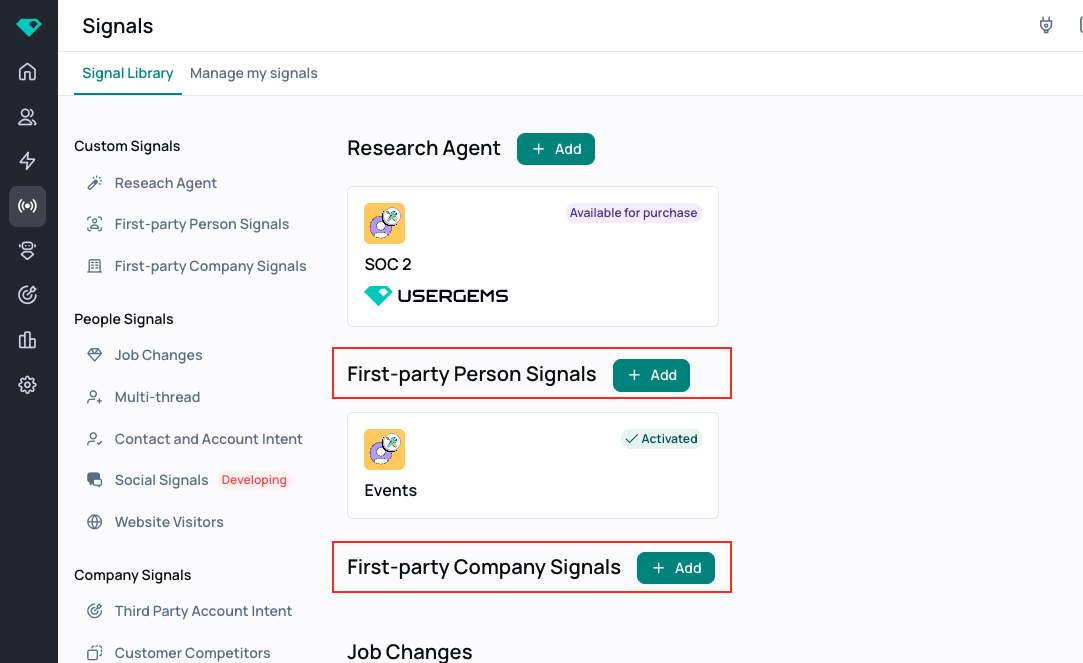
Method 1: CRM Reports & Lists
Use this method when your first-party data already lives in your CRM and can be expressed as a Salesforce report or HubSpot list. This is the fastest path and recommended for dynamic reports and lists.
Setup
- In UserGems, open Signals and find "First-party Person Signals" or "First-party Company Signals"
- Click "+Add" to create a new Custom Signal.
- Select "Upload Salesforce Report" or "Upload HubSpot List" as your ingestion method.
- Connect your Salesforce or HubSpot instance if not already linked.
- Input the Salesforce report ID or HubSpot list ID that contains the relevant records.
- Map the report fields
- Under "Signal Information" you can map specific fields for more details (i.e., you might want to upload an Event Registrations list with a status to indicate "No Shows" VS "Attendees")
- Set your refresh cadence (how often UserGems should re-import the report or list).
- Check the "Create a company list" checkbox, if desired (if you upload a list of Past Inbound leads, UserGems can automatically create a report of the companies for those leads. Then, you can run a campaign to find prospects missing in CRM at companies with a past inbound lead)
- Check the "Search prospects with persona" checkbox and select a persona, if desired. This will find persona matching prospects at these accounts.
Tip: Your CRM report or list can contain contacts, leads, or accounts — UserGems will match records by email or domain. Make sure the report or list includes the fields needed for matching.
Common Use Cases
Method 2: API Push
Use this method when your data lives outside your CRM — in a data warehouse, product analytics system, or custom backend. Once set up, data flows into UserGems automatically without manual exports.
Setup
- In UserGems, go to Settings > Connected Applications and scroll to the bottom.
- Locate your UserGems API Token.
- Use the API to push records (persons or companies) with the relevant signal data.
- Map the payload fields to UserGems schema fields (email for persons, domain for companies).
- Push records to UserGems via API
- Check in Signals to review the data sent
Finding your API key
Settings > Connected Applications, at the bottom of the page. Copy the key and store it securely — this key authenticates all data pushes.
Security: The API is write-only — responses return only "success" or "failed", so a leaked key cannot expose your data. The main risk of a leaked key is that incorrect data could be written to your account. Keys are not auto-rotated but can be changed upon request by contacting your CSM.
Sample API Payload
Signals appear in UserGems automatically as soon as a successful API call is received — no additional configuration required. Here is an example payload:
Custom parameters (like creditsUsed above) can be any key-value pair relevant to your use case. These values are stored with the signal record and can inform Gem-E personalization.
Common Use Cases
Method 3: CSV Upload
If your data does not live in your CRM or cannot be sent via API, you can alternatively upload data via a CSV file.
- In UserGems, open Signals and find "First-party Person Signals" or "First-party Company Signals"
- Click "+Add" to create a new Custom Signal.
- Select "Upload CSV report" as your ingestion method.
- Map the report fields
- Under "Signal Information" you can map specific fields for more details (i.e., you might want to upload an Event Registrations list with a status to indicate "No Shows" VS "Attendees")
- Check the "Create a company list" checkbox, if desired. This will automatically create a report of the companies for those leads.
- Check the "Search prospects with persona" checkbox and select a persona, if desired. This will find persona matching prospects at these accounts.
What You Can Do With Custom Signals
Once a Custom Signal is live in UserGems, it behaves like any other signal in the platform. You can:
- Use it as a trigger in Signal Sets to launch Gem-E campaigns
- Feed it into Account & Contact Scoring models or map Buying Stage to weight first-party intent higher
- Personalize Gem-E AI-written outreach by referencing the signal in the prompt context (we recommend going to Content → Conditional Instructions → add a filter for your custom signal and feeding custom instructions there)
- Combine it with other native signals in the UserGems Library (i.e., Customer Competitors, Job Changes, Contact-Level Intent, Website Visitors, etc)
Custom signals are most powerful when layered with other signals.
Data Requirements
Person Records
The following fields are required or recommended when pushing person-level signals to POST /v1/contact:
Company Records
For company-level signals, push to POST /v1/account:
FAQ
Can I use Custom Signal with Gem-E for AI outreach personalization?
Yes. Any custom signal field passed through the API can be referenced in Gem-E prompt configuration, allowing highly personalized messaging. For example, a credit overconsumption signal can tell Gem-E exactly which product feature the contact is using heavily — making outreach far more relevant than a generic expansion email.
How often can I push data via API?
The API is limited to 20 requests per second, and accepts one record per request. Most teams push in real time (event-triggered) or on a scheduled batch (daily/hourly). If you plan to push high volumes continuously, talk to your UserGems CSM.
Can Custom Signal feed account scoring?
Yes. Custom Signal data can be used as an input to UserGems' Account & Contact Scoring models. For example, you can create a scoring rule that boosts account score when a recent inbound demo request is detected via Custom Signal.
How does UserGems handle repeated events for the same person?
UserGems uses the latest received entry as the source of truth for each signal per person. New pushes overwrite the previous values — UserGems does not sum or aggregate across multiple calls.
The recommended pattern for cumulative metrics (e.g., number of logins, dashboard unlocks) is to maintain the running total in your system and send the updated total with each push. For example, if a user unlocks a dashboard for the 5th time, send a single call with { dashboardUnlocks: 5 } rather than five separate calls. This also makes corrections simple: if you send incorrect data, just push again with the correct values.
Is the API key secure if leaked?
The API is write-only — the only response returned is success or failed. A leaked key cannot expose any of your data. The main risk is that an unauthorized party could write incorrect data to your account. Keys are not auto-rotated; contact your CSM to request a key rotation if needed.
Do I need engineering support to set up CRM report/list ingestion?
No. The CRM Reports & Lists method is self-serve and requires no code. You need Salesforce or HubSpot access to build or share the relevant report or list, but the UserGems setup itself is point-and-click. API Push does require engineering support to build the push logic.